Guide
Use your own domain
Your hub can live at your own address — kb.yourbrand.com instead of a page on ours. It takes one DNS record. This guide shows exactly what to put in Cloudflare, and how to check it worked.
Before you start
- Your plan is Starter or higher. Custom domains are included in it — there is nothing extra to buy.
- You use a subdomain, like
kb.yourbrand.comorlisten.yourbrand.com. A bare domain (yourbrand.com) is not supported, so your main site keeps working untouched. - You can edit DNS for that domain. In Cloudflare that means access to the zone; in most teams the person who set up the website has it.
Tell Podify which address you want
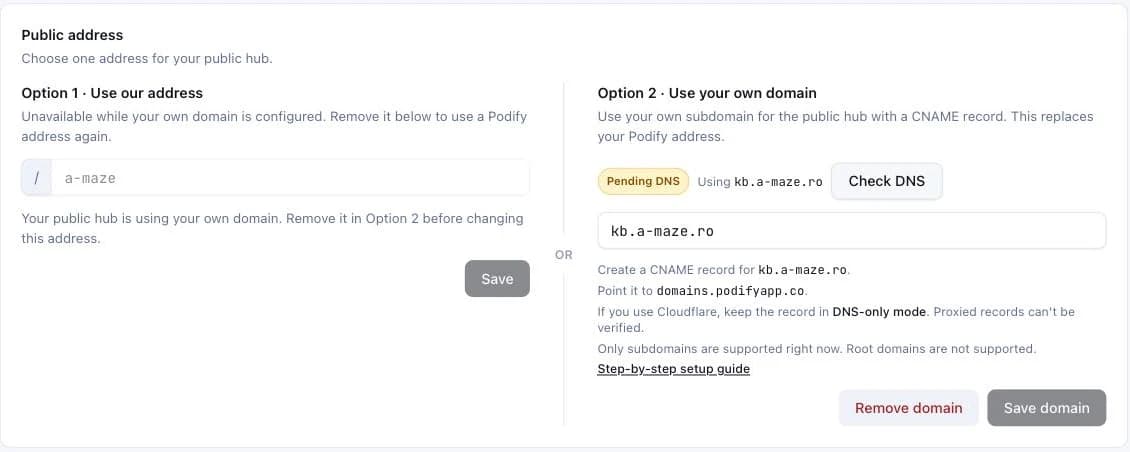
In Podify, open Settings → Custom domain, type the subdomain you picked, and save. The status turns to Pending DNS. Nothing changes for your visitors yet.
Add one CNAME record in Cloudflare
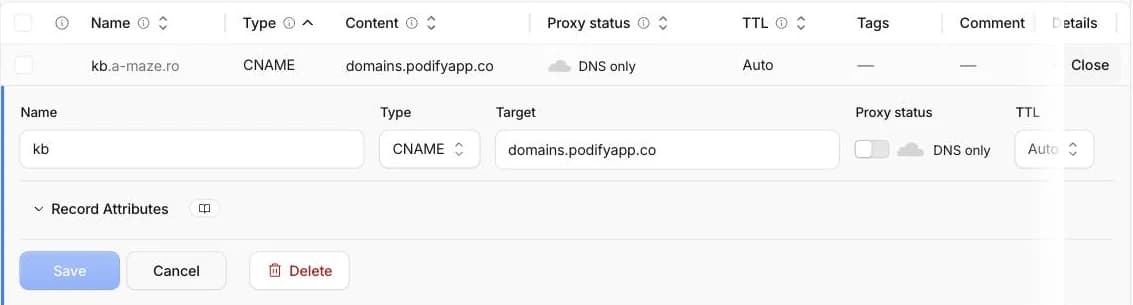
Open dash.cloudflare.com, pick your domain, then go to DNS → Records → Add record. Fill it in like this:
| Type | CNAME |
|---|---|
| Name | kbJust the part in front of your domain. Typing the whole kb.yourbrand.com here gives you kb.yourbrand.com.yourbrand.com. |
| Target | domains.podifyapp.coCopy it exactly, with no trailing dot and no https://. |
| Proxy status | DNS only (grey cloud)This one matters — see below. |
| TTL | Auto |
Save. That is the whole DNS change.
Leave the cloud grey
Cloudflare shows an orange cloud next to a record when it proxies the traffic. For this record it has to stay grey — DNS only. With the orange cloud on, the certificate for your subdomain cannot be issued and the address will not load, no matter how long you wait. If you already turned it on, click it to turn it off; nothing else needs changing.
Come back and verify
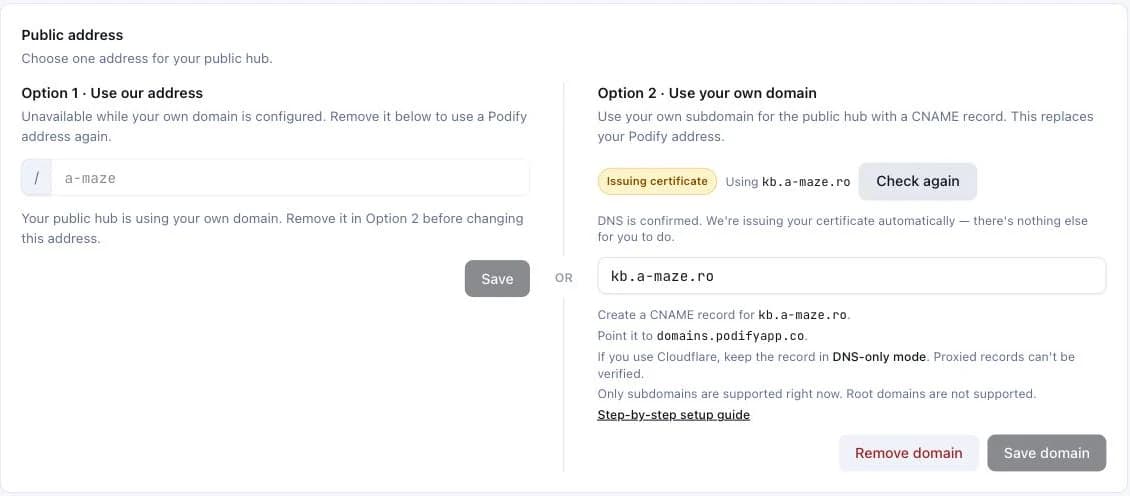
Back in Settings → Custom domain, click Check DNS. When the record has spread — usually a few minutes — the status moves to Issuing certificate: DNS is confirmed and we're getting your HTTPS certificate automatically, nothing else for you to do. A few minutes after that it turns Active and your hub starts answering on your address. We also keep checking on our own at every step, so a domain that needs a bit longer will switch over without you watching it.
You can check the record yourself from a terminal:
dig +short CNAME kb.yourbrand.com
→ domains.podifyapp.co.
What changes once it is live
- Your hub answers on your address, and your old Podify address redirects to it. Links people already shared keep working.
- Search engines are told your address is the real one, so the pages are indexed under your brand rather than ours.
- Your email is untouched. This record sits on a subdomain and does not go near the records that route mail.
If something does not work
- It still says Pending DNS
- Check three things, in this order: the cloud is grey, the target is exactly
domains.podifyapp.co, and the record is on the subdomain you typed in Podify. A record onwwwwhen you asked forkbwill wait forever. - It says Issuing certificate and does not move
- That step is automatic and normally takes a few minutes. If it sits there for close to an hour, the certificate could not be issued — the domain moves to broken and we email you. The most common cause is the DNS record getting edited or removed again right after the first check passed. Put it back and verify again; there is nothing to configure on our side.
- It worked, and then it broke
- Almost always the record was edited or removed. We email you when we notice, and your hub stays reachable at its Podify address the whole time — visitors never hit a dead page.
- I want it on my main domain, not a subdomain
- Not supported today. A bare domain carries your website and often your email, and pointing it here would take both down. Use a subdomain.
- My DNS is not at Cloudflare
- It is the same single record everywhere — only the labels differ. Namecheap and GoDaddy call the Name field Host and the Target field Value or Points to. There is no proxy setting to worry about outside Cloudflare.
- My plan changed
- Custom domains need Starter or higher. If a subscription lapses, your address stops serving and visitors go back to your Podify address. Your DNS record can stay where it is — it starts working again when the plan does.
Still stuck? We'll do it with you
DNS panels differ, and none of them are friendly. Book a call and we go through yours together on a screen share — it is one record, and it usually takes about ten minutes. Bring the login for wherever your domain lives; that is the only thing we cannot do from our side.
Book a setup call